TypeScript 基礎:介面 interface
前言
前面的文章已經有稍微介紹了介面(interface)的用法,介面能夠幫助我們定義物件應該有哪些屬性和方法,從而提供一種強型別的約束機制,讓開發者更容易組織代碼並進行程式設計。
介面的用途
- 描述物件形狀:介面可以用來定義物件有哪些屬性和方法,並強制實作這些屬性。
- 強制類別實作方法:介面可以強制某個類別實作指定的方法,保證類別符合某種行為規範。
- 多重繼承:類別只能繼承一個父類,但可以實作多個介面,從而模擬多重繼承。
介面語法
定義類別的介面
介面可以用來定義類別應該實作哪些屬性和方法。這種方式能夠提供強型別的保證,並幫助類別遵循某種行為規範。介面是一種協議,它定義了類別的結構,但不提供具體實現。
interface AnimalInterface {
name: string
makeSound: () => void
}
interface SuperpowerInterface {
usePower: () => void
}
// 使用 implements 關鍵字來實現介面,且可以實現多個介面
class DogInterface implements AnimalInterface, SuperpowerInterface {
constructor(public name: string, protected powerName?: string) {}
makeSound() {
console.log('汪!')
}
usePower() {
if (this.powerName) {
console.log(`使用${this.powerName}`)
}
else {
console.log('沒有超能力')
}
}
}
const dog = new DogInterface('彭德', '預知未來')
dog.makeSound() // 汪!
dog.usePower() // 使用預知未來定義物件的介面
介面不僅可以用來規範類別,還可以用來描述物件的形狀。這使得在 TypeScript 中操作物件時,可以強制檢查物件是否符合預期的結構。
interface Animal {
name: string
makeSound: () => void
}
const usagi: Animal = {
name: '烏薩奇',
makeSound() {
console.log('嗚啦!')
}
}
usagi.makeSound() // 嗚啦!定義函式的介面
介面還可以用來定義函式的形狀,包含函式的參數類型與返回值,寫在同個 interface 也比較好管理函式重載。
// 利用函式重載的方式撰寫
interface GetDigitCount {
(x: string): number
(x: number): number
}
const getDigitCount: GetDigitCount = (x) => {
// 判斷數字的正則表達式
const regexp = /^-?(\d+)\.?\d*$/
const match = x.toString().match(regexp)
if (!match)
return 0
return match[1].length
}
console.log(getDigitCount(12345)) // 5
console.log(getDigitCount('-9876')) // 4介面繼承
介面支持繼承,這使得我們可以將複雜的結構拆分為更小的部分,並且能夠讓新介面繼承已定義的屬性或方法。這一特性提高了代碼的重用性。
interface Shape {
color: string
}
// 跟 class 一樣可以用 extends 關鍵字來繼承
interface Circle extends Shape {
radius: number
}
const circle: Circle = {
color: 'red',
radius: 10
}自動合併
如果在同一作用域內定義了多個同名介面,TypeScript 會自動將這些介面合併成一個介面。這個特性稱為介面合併,它在處理大型系統中的不同模組時非常有用。
interface PersonInterface {
name: string
}
interface PersonInterface {
age: number
}
// 最終會自動合併介面,方便大型專案擴展型別
const person: PersonInterface = {
name: 'Johnson Mao',
age: 18
}綜合比較
在實際使用中,type 和 interface 都有其優勢,選擇哪一個主要取決於具體需求和團隊偏好。
以我個人而言,如果需要定義物件的結構、擴展和合併的能力,我會選擇使用 interface 來定義,其餘都使用 type 的方式定義。
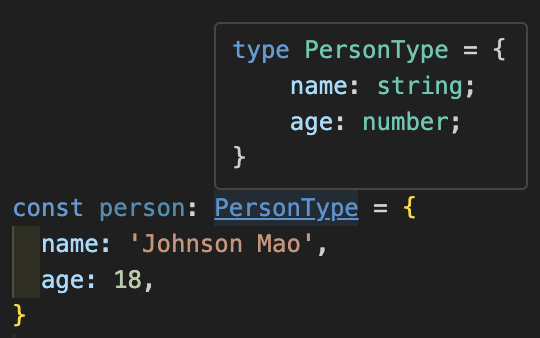
不過 type 在編輯器中會顯示結構還蠻方便的。
介面(interface)vs 型別(type)
雖然 interface 和 type 都能用於定義型別,但它們還是有一些重要的區別。了解這些異同可以幫助你在不同情況下選擇最合適的工具來定義型別。
相同的地方
-
都可以定義物件結構
// 使用 interface 定義物件型別 interface PersonInterface { name: string age?: number [key: string]: unknown } // 使用 type 定義物件型別 interface PersonType { name: string age?: number [key: string]: unknown } -
都有擴展物件的方式
// 透過 extends 繼承另一個物件 interface EmployeeInterface extends PersonInterface { position: string } // 透過 & 融合不同物件 type EmployeeType = PersonType & { position: string }
不同的地方
-
interface 只能定義物件型別。
type IdType = string | number // interface 就不能定義原始型別、元組、交集...等 -
interface 聲明同名會自動合併,type 不能聲明同名
interface可以多次聲明同名,TypeScript 會自動合併這些聲明。interface PersonInterface { name: string } interface PersonInterface { age: number } // 最終會自動合併介面,方便大型專案擴展型別 const person: PersonInterface = { name: 'Johnson Mao', age: 18 }type不能這樣重複聲明同名
// Error: 識別碼 ‘PersonType’ 重複。 interface PersonType { name: string; }
    // Error: 識別碼 'PersonType' 重複。
    interface PersonType {
        age: 18;
    }
    ```
- interface 繼承物件比 type 交集更嚴謹
interface的繼承比較嚴謹interface PersonInterface { id: string } /** * Error: * 介面 'EmployeeInterface' 不正確地擴充介面 'PersonInterface'。 * 屬性 'id' 的類型不相容。 * 類型 'number' 不可指派給類型 'string'。 */ interface EmployeeInterface extends PersonInterface { id: number }type的交集則自動將屬性進行交集處理,不會提示屬性是否重複interface PersonType { id: string } // 並不會警告 id 因為 string 與 number 交集,變成了 never 的型別 type EmployeeType = PersonType & { id: number }
介面(interface)vs 抽象類別(abstract class)
介面和抽象類別都可以用來強制子類實作某些方法和屬性,但它們在概念和用途上存在一些明顯差異
介面(interface)
只能描述物件的結構,不能有任何的程式碼方法實現,同時一個類別可以實現(implements)多個介面
抽象類別(abstract class)
可以有抽象方法,也可以實作具體方法,但是一個類別只能繼承一個抽象類別
參考文獻
Related Posts
TypeScript 後記
終於完成連續三十天的鐵人賽文章撰寫!距離我第一次參加鐵人賽已經三年之久了。這次參加主要是因為朋友邀請一起參賽,同時我自己也想藉此機會深入了解 TypeScript 5 的新功能,強迫自己透過寫作來吸收知識。
TypeScript 實戰:製作 npm Package
在開發專案時,經常會遇到跨專案共用邏輯或工具的情況,例如常用的 logger 或驗證工具。如果每次都從一個專案複製貼上到另一個專案,難免會出現版本不同步或維護困難的問題。為了解決這類問題,我們可以將這些共用邏輯獨立成為 npm 套件,以便在多個專案中重複使用。
TypeScript 實戰:前端表單與串接 API
在現代前端開發中,與後端進行資料交換是常見的需求。透過 HTTP 請求,我們可以將資料送出並取得結果。這篇文章將介紹如何使用 TypeScript 實作前端表單與串接 API,並展示如何將這些功能結合到 React 應用中。同時,文章還會介紹如何解決跨域問題(CORS),以便讓前後端能順利溝通。

Johnson Mao
A passionate software engineer and blogger sharing thoughts on technology, AI, and development.